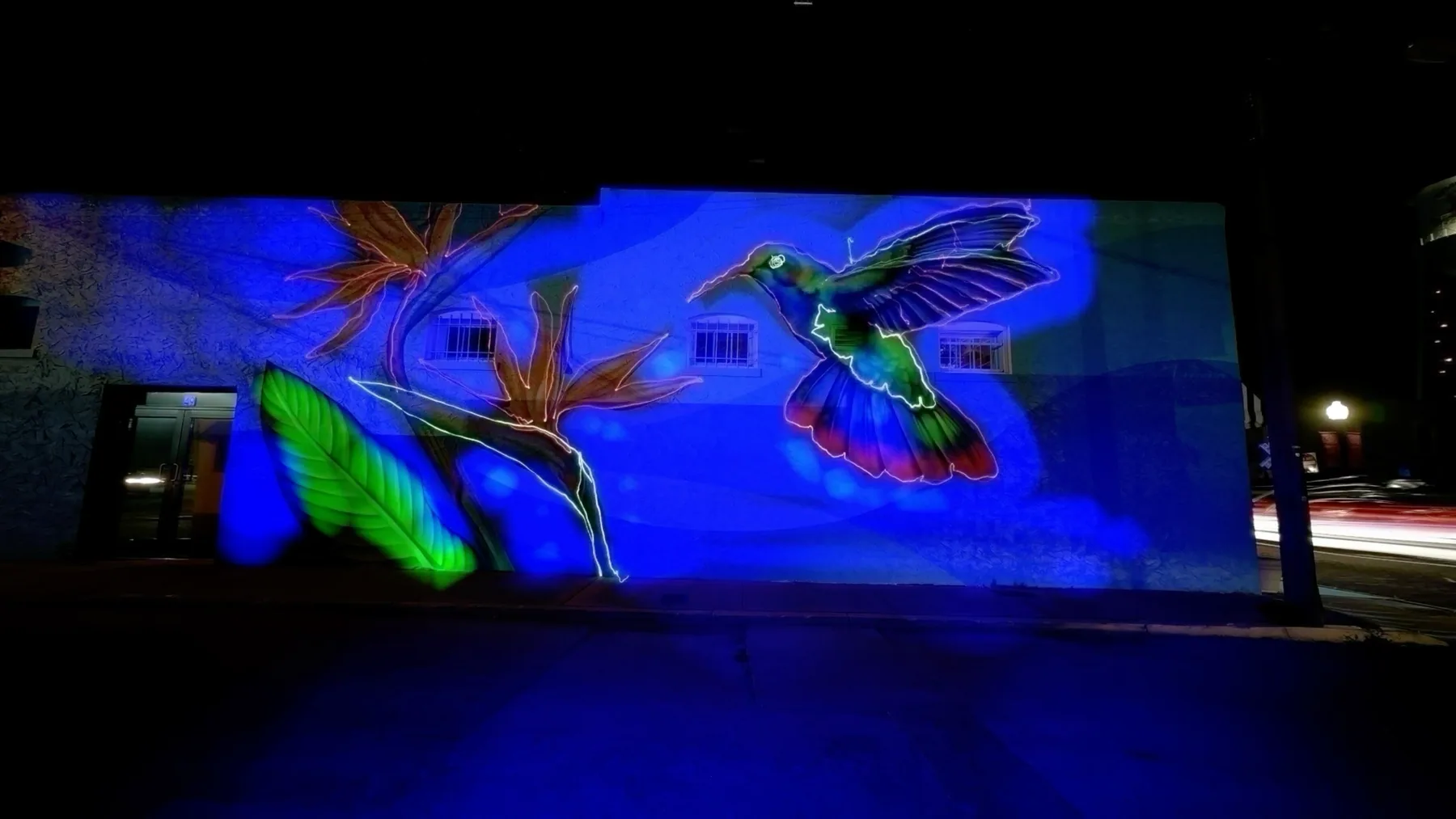
Frame Blending & Light Painting
Create stunning visual effects without post-processing
Frame blending involves capturing several images in a sequence and blending them together to get a final result. Usually achieved in post-processing, this technique requires a significant amount of time and editing. However, TimeLapsed is here to simplify the process and do it in real time with no post processing!
The TimeLapsed app offers a range of built-in frame blending algorithms, providing you the flexibility to select the one that best suits your environment. These algorithms seamlessly merge frames throughout your timelapse, generating a video from which you can extract still images. This functionality results in captivating effects such as night light painting, vehicle or airplane light trails, star trails, space station flyovers, or rocket launches.
While light painting and vehicle trails produce incredible results, don't limit yourself there. There are also amazing blending effects achievable during the daytime or by playing with shadows.
What You'll Learn
This guide will teach you how to select the right light sources, adjust camera settings, properly mount your camera, choose appropriate blending profiles, master painting techniques, and save and export your work. By the end, you'll be creating amazing light paintings and frame blending effects with your iPhone.
Choosing Your Light Sources
The right tools for creative light painting
Effective light painting starts with selecting the right light sources. Different sources create unique effects and atmospheres in your timelapses.
Finger Lights
Small LED lights that fit on your fingertips, perfect for intricate light painting patterns. Their compact size gives you precise control over your light trails.
Light Sticks & Wands
LED or fiber optic sticks that create broader, more dramatic light trails. Perfect for large sweeping movements and creating colorful patterns.
Flashlights
Traditional flashlights create strong, focused beams. Use different colored filters to add variety to your light paintings or try models with adjustable focus.
Environmental Lights
Vehicle headlights, street lamps, and building lights can all become part of your frame blending composition. Position your camera to capture these moving light sources.
Pro Tip
For the most vivid results, use light sources with high brightness in dark environments. The contrast between your light source and the background greatly affects the final appearance of your light trails.
Don't forget that your iPhone's built-in flashlight can also be used as a light source! This is especially useful when you're just getting started and want to experiment without purchasing additional equipment.
Camera Settings for Frame Blending
Optimize your TimeLapsed App configuration
Proper camera settings in the TimeLapsed App are crucial for achieving stunning frame blending and light painting effects. Here's how to optimize your setup:
Frame Blending Length
This is perhaps the most important setting for your light painting. The frame blending length determines how many frames are composited together:
- Short (2-5 frames): Best for quick-moving light sources like vehicle traffic or when you want minimal trailing effects.
- Medium (6-15 frames): Ideal for most light painting projects, offering good balance between trail length and control.
- Long (16+ frames): Creates dramatic, extended trails. Perfect for star trails, complex light painting artworks, or capturing long-duration events.
Interval Settings
The interval between frames affects how your light trails appear:
- Short intervals (0.5-1 second): Create smooth, continuous light trails. Best for most light painting projects.
- Longer intervals (2+ seconds): Create more distinct, separated points of light. Good for emphasizing movement patterns.
Additional Camera Settings
ISO Setting
Lower ISO (100-400) generally produces cleaner images with less noise, ideal for dark backgrounds. However, if your light source is dim, you may need a higher ISO to make your light trails more visible.
Exposure
For light painting against dark backgrounds, lower exposure helps maintain the darkness while highlighting your light trails. For daytime frame blending, adjust exposure to balance with ambient light.
Setting Recommendation
Start with the built-in light painting profiles in TimeLapsed App. These provide optimized settings for different scenarios. Once you understand how they work, you can customize them for your specific environment and creative vision.
Secure Camera Mounting
Stability is key for frame blending success
For successful frame blending and light painting, a stable camera mount is absolutely essential. Any camera movement will blur the background and disrupt the blending effect.
Recommended Equipment
Sturdy Tripod
A solid tripod is the foundation of good frame blending. Look for features like:
- Stable legs with rubberized feet
- Adjustable height and leg angles
- Ball head for flexible positioning
- Weight hook to add stability in windy conditions
Phone Mount
A quality phone mount securely holds your iPhone on the tripod. Important features:
- Secure locking mechanism (avoid spring-loaded mounts that might drop your phone)
- Standard 1/4"-20 thread for tripod attachment
- Adjustable angle for flexible composition
Magic Arms and Clamps
For creative mounting positions, consider "magic arms" with clamps that can attach to various surfaces. These are excellent for mounting your iPhone in unusual locations or when a traditional tripod won't work.
Important Warning
Be cautious of wind-induced movement of your tripod or camera mount, as this can cause the background to blur during the frame blending process. Use the heaviest, most stable tripod available, especially for longer exposure sessions.
For creative effects, you can intentionally move your camera during frame blending to create streak effects where there are lights, resulting in unique transitions between scenes. However, this should be done deliberately, not because of an unstable setup.
Frame Blending Profiles
Pre-configured settings for specific effects
The TimeLapsed App comes with several pre-configured frame blending profiles, each designed for specific scenarios and effects. These profiles save you time by automatically configuring optimal settings for different light painting situations.
Built-in Blending Profiles
Light Painting
Designed for creating artistic light trails with handheld light sources:
- Optimized for dark environments
- Long frame blending length to capture extended movements
- Preserves background details while emphasizing light sources
- Great for writing words or creating shapes with lights
Vehicle Lights
Perfect for capturing traffic light trails:
- Medium frame blending length to capture vehicle movement
- Optimized for nighttime or low light conditions
- Balances exposure to maintain building details while capturing light trails
- Works best when positioned above busy roads or intersections
Star Trails
Designed to capture the movement of stars across the night sky:
- Extended frame blending length for capturing slow-moving celestial objects
- Higher ISO sensitivity to capture faint star light
- Optimized for extremely dark environments
- Works best when pointed at clear night skies away from light pollution
Daytime Blending
For creative daytime effects with moving objects:
- Shorter frame blending length to avoid overexposure
- Lower exposure compensation to handle bright ambient light
- Ideal for waterfalls, busy pedestrian areas, or moving clouds
- Creates a smooth, ethereal effect in daylight scenes
Creating Custom Profiles
As you gain experience with frame blending, you can create and save your own custom profiles. This allows you to fine-tune settings for your specific style and shooting locations.
To save a custom profile in TimeLapsed App:
- 1.Set up your preferred frame blending parameters
- 2.Tap the save icon in the profiles menu
- 3.Give your profile a descriptive name
- 4.Your custom profile will now appear in your profiles list for future use
Pro Tip
Test your frame blending profile in a short session before committing to a long timelapse. This allows you to make adjustments based on your specific environment and lighting conditions.
Light Painting Techniques
Creative approaches to frame blending art
With your TimeLapsed App configured and your camera securely mounted, it's time to explore various techniques to create stunning light paintings and frame blending effects.
Basic Techniques
Writing with Light
Create words or messages by "writing" in the air with your light source:
- Work quickly but deliberately - you have limited time within the frame blending window
- Write in reverse (as if looking at yourself in a mirror) so it appears correct on camera
- Keep consistent movement speed for uniform light intensity
- Practice your motions before starting the timelapse
Creating Shapes and Patterns
Form geometric shapes, spirals, or abstract patterns:
- Use slow, deliberate movements for clean lines
- Experiment with distance from the camera - moving closer/further creates depth
- Try spinning lights on strings for perfect circles and spirals
- Use multiple colors by switching light sources during the exposure
Silhouette Integration
Combine human silhouettes with light painting:
- Have a person stand still in the frame for a few seconds to capture their silhouette
- Create light patterns around the person, such as wings or halos
- For cleaner silhouettes, briefly illuminate the person with a flash or constant light
- Experiment with the person moving slowly during the exposure for ghosting effects
Advanced Techniques
Kinetic Light Painting
Create striking abstract patterns by attaching lights to moving objects like spinning wheels, fans, or even toys. The natural movement creates perfect geometric patterns that would be impossible to draw by hand.
Light Stencils
Create cutout stencils from cardboard and shine lights through them toward the camera. This produces crisp, defined shapes and patterns in your light painting. Move the stencil during exposure for repeated patterns.
Environmental Integration
Incorporate your light painting with the environment. For example, add light trails to a cityscape, trace around architectural features, or interact with statues or public art.
Practice Makes Perfect
Light painting is a skill that improves with practice. Start with simple patterns and short timelapses, then gradually work up to more complex designs as you build confidence and understand how the TimeLapsed App renders your movements.
Remember that light painting is an artistic process - don't be afraid to experiment, make mistakes, and develop your unique style. The TimeLapsed App makes this process much more accessible by showing you results in real-time rather than waiting for long exposures to complete.
Saving & Exporting Your Work
Preserving and sharing your frame blending creations
After creating your frame blending masterpiece, you'll want to save and share your work. The TimeLapsed App offers several options for preserving your creations.
Saving Your Work
Save Frame Blending Profiles
Preserve your custom settings for future use:
- After finding the perfect settings for your environment, save them as a custom profile
- Give your profile a descriptive name that reminds you of the scenario (e.g., "Night City Traffic" or "Backyard Star Trails")
- Your saved profiles will appear in the "My Profiles" section of the camera launch screen
- This ensures you can quickly recreate successful setups in the future
Save Frequently During Sessions
Create new timelapses for different scenes:
- Light painting can quickly fill the screen with trails, potentially becoming cluttered
- Save and create a new timelapse whenever you want to start with a clean canvas
- This strategy gives you multiple videos to choose from later
- Each saved timelapse is stored within the app and can be accessed from your projects list
Exporting Options
Export Videos
Share your entire timelapse sequence:
- Export completed timelapses to your device's Photo Library
- Choose from various quality settings based on your sharing needs
- Full Version users can access additional export options and formats
- Share directly to social media platforms or messaging apps
Extract Still Images
Capture perfect moments from your timelapses:
- Click the Camera icon while watching your timelapse to capture a still frame
- Extract your favorite frames showing the most interesting light patterns
- Stills are saved to your Photo Library for easy sharing
- These high-quality images can be edited further in other apps
Preserving Memory Space
Frame blending sessions can generate large files, especially longer timelapses. After exporting your favorites to your Photo Library or cloud storage, you can clean up space in the app by deleting older projects you no longer need.
The TimeLapsed App is designed to make sharing your creative work simple. Whether you're posting to social media, creating a portfolio, or just sharing with friends, you have multiple options to showcase your frame blending and light painting masterpieces.
Related Guides
Recommended Gear
Discover the essential equipment to enhance your timelapse and light painting experience.
Tilt Shift Guide
Learn how to create miniature world effects with tilt-shift photography in TimeLapsed App.
iPhone Timelapse Guide
Master the fundamentals of creating timelapses with your iPhone using TimeLapsed App.
Ready to Create Your Own Frame Blending Art?
Download the TimeLapsed App today and start creating stunning timelapses, light paintings, and frame blending effects with just your iPhone.